Your 2026 Digital Audit Checklist: Start the Year With a Clean Slate
New year, new opportunity to fix what's broken. A comprehensive checklist to audit your website, SEO, social media, and digital presence in January 2026.
January is when gyms are packed, diets start fresh, and businesses make ambitious plans they'll forget by March.
But here's an annual ritual that actually pays off: auditing your digital presence.
I do this for clients every January, and without fail, we find broken things, outdated things, and opportunities hiding in plain sight. Last year, a simple audit revealed that a client's contact form had been broken for three months. Three months of lost leads, and nobody noticed.
Don't let that be you.
Here's the comprehensive checklist I use. Set aside 2-3 hours, grab a coffee, and work through it systematically. Your future self will thank you.
Part 1: Website Health Check
Your website is the hub of your digital presence. Start here.
Technical Fundamentals
Speed test your site:
- Run your homepage through PageSpeed Insights
- Check mobile score (aim for 70+, ideally 90+)
- Check desktop score (aim for 80+)
- Note any specific issues flagged (image optimization, render-blocking resources, etc.)
Mobile experience:
- Pull up your site on your actual phone
- Can you read everything without zooming?
- Are buttons big enough to tap?
- Does the navigation work smoothly?
- Try filling out your contact form on mobile
Broken links and errors:
- Check Google Search Console for crawl errors
- Click through your main navigation pages
- Test all contact forms (actually submit them)
- Verify phone number links work
- Check that email links open correctly
Security basics:
- SSL certificate valid (https:// with padlock)
- WordPress/CMS updated to latest version
- Plugins/extensions updated
- Remove any plugins you're not using
- Verify backup system is working
Content Audit
Homepage review:
- Is your value proposition clear within 5 seconds?
- Are your services/products prominently featured?
- Is there a clear call-to-action?
- Is the content still accurate?
- Does it reflect your current business focus?
Service/product pages:
- Review each page for accuracy
- Update any outdated pricing or offerings
- Check that all images load properly
- Verify calls-to-action are working
- Look for opportunities to add recent work or testimonials
About page:
- Update team information if there have been changes
- Refresh your bio if needed
- Check that your story still resonates
- Update any credentials, awards, or milestones
Contact information:
- Verify address is correct (especially if you moved)
- Check phone numbers
- Test email addresses
- Update business hours if changed
- Verify Google Maps embed shows correct location
Blog/content:
- Archive or update severely outdated posts
- Check that old posts don't reference past dates ("in 2024, we expect...")
- Identify top-performing content worth updating
- Note content gaps for your 2026 calendar
Legal and Compliance
- Privacy policy updated for current year
- Terms of service still accurate
- Cookie consent working properly
- ADA accessibility basics in place
- Copyright year updated (should be automatic, but check)
Part 2: SEO Health Check
Even if you're not actively doing SEO, these basics matter.
Google Search Console Review
If you don't have Search Console set up, stop and do that now. It's free and essential.
- Check for any manual actions or security issues
- Review coverage report for errors
- Look at your top-performing pages
- Note which queries are bringing traffic
- Check mobile usability report
Google Business Profile Audit
For local businesses, this is often more important than your website.
- All information accurate and complete
- Business hours correct (including holiday hours)
- Photos updated with recent images
- Services/products listed correctly
- Posts are current (not from 6 months ago)
- Q&A section monitored and answered
- Review response strategy in place
Review quick check:
- How many reviews did you get in 2025?
- Are you responding to all reviews?
- Any negative reviews that need addressing?
- Do you have a system for requesting reviews?
Local Citations
Your business information should be consistent everywhere.
Check these platforms for accuracy:
- Yelp
- Facebook Business
- Apple Maps
- Bing Places
- Industry-specific directories
Look for:
- Old addresses or phone numbers
- Duplicate listings
- Inconsistent business names
- Missing information
Basic On-Page SEO
- Do your main pages have unique title tags?
- Are meta descriptions written (not auto-generated)?
- Do images have alt text?
- Is your site structure logical?
- Are you targeting relevant local keywords?
Part 3: Social Media Audit
Time to clean up those profiles.
Profile Basics (Check Each Platform)
- Profile photo current and professional
- Cover/banner image updated
- Bio accurate and compelling
- Website link correct and working
- Contact information current
- Business hours accurate
Content Review
What worked in 2025:
- Which posts got the most engagement?
- What content types performed best?
- Which days/times worked well?
- Any viral or standout moments?
What didn't work:
- Content that got zero engagement
- Platforms that aren't generating results
- Posting frequencies that weren't sustainable
Platform audit:
- Are you active on too many platforms?
- Should you drop any platforms entirely?
- Are there platforms your audience uses that you're ignoring?
Follower/Connection Quality
- Remove obvious bots or spam followers (where possible)
- Check that you're following relevant accounts
- Unfollow inactive or irrelevant accounts
- Look for local businesses to connect with
Part 4: Analytics Review
If you're not measuring, you're guessing.
Google Analytics Check
- GA4 is installed and collecting data
- Goals/conversions are set up
- Site search tracking enabled (if applicable)
- Spam traffic filtered out
- You know how to access basic reports
Key Questions to Answer
Traffic trends:
- Did website traffic increase or decrease in 2025?
- Where is your traffic coming from?
- Which pages get the most visits?
Conversion performance:
- How many leads/sales came through the website?
- What's your conversion rate?
- Which traffic sources convert best?
User behavior:
- What's your bounce rate on key pages?
- How long do people spend on your site?
- Where do people drop off?
Create Your Baseline
Document these numbers as your 2026 starting point:
- Monthly average visitors
- Top 5 traffic sources
- Conversion rate
- Top 5 landing pages
- Mobile vs. desktop split
Part 5: Email and CRM Audit
Your email list and customer data need attention too.
Email List Health
- How many subscribers do you have?
- What's your average open rate?
- What's your average click rate?
- When did you last clean your list?
List cleaning tasks:
- Remove bounced email addresses
- Consider removing long-term non-openers
- Check for duplicate entries
- Verify signup forms are working
- Test welcome/automated emails
CRM Review
- Is customer data up to date?
- Are there duplicate records to merge?
- Is contact information accurate?
- Are notes and history being captured?
- Do you have a system for regular updates?
Part 6: Competitive Quick-Check
Know what you're up against.
Competitor Snapshot
Pick 3-5 direct competitors and quickly assess:
- How does their website compare to yours?
- What are they ranking for in Google?
- How active are they on social media?
- What are customers saying in their reviews?
- Have they made any notable changes recently?
Look for:
- Features or content you're missing
- Weaknesses you can exploit
- Ideas worth adapting (not copying)
- Gaps in the market
Part 7: Security and Backup Audit
The stuff nobody thinks about until disaster strikes.
Password Hygiene
- When did you last update passwords?
- Are you using unique passwords for each service?
- Is two-factor authentication enabled where possible?
- Who has access to your accounts? (Remove former employees/vendors)
Backup Verification
- Website backups running automatically
- Test that backups actually restore
- Important files backed up (not just on one computer)
- Know how to restore if something breaks
Access Audit
- Review who has admin access to your website
- Check social media account access
- Review Google Analytics/Search Console users
- Remove anyone who shouldn't have access
Part 8: Action Planning
An audit is useless without action. Now prioritize.
Categorize Your Findings
Fix immediately (broken things):
- Anything that's preventing leads or sales
- Security vulnerabilities
- Broken forms or links
- Incorrect contact information
Fix this month (important but not urgent):
- Outdated content
- Missing SEO basics
- Profile inconsistencies
- Speed issues
Plan for Q1 (improvements):
- Content gaps to fill
- New features to add
- Platforms to expand or abandon
- Tools to implement
Research further (needs investigation):
- Competitive opportunities
- New tools or platforms
- Strategic changes
Set Specific Goals
Based on your audit, set 3-5 measurable goals for 2026:
Example goals:
- Increase website conversion rate from 2% to 3%
- Get 50 new Google reviews
- Reduce page load time to under 3 seconds
- Publish 2 blog posts per month consistently
- Grow email list by 500 subscribers
Create Your Calendar
Block time on your calendar for:
- Implementing immediate fixes (this week)
- Monthly check-ins (15 minutes)
- Quarterly mini-audits (1 hour)
- Next annual audit (January 2027)
The Printable Checklist
Want a condensed version you can print and check off? Here are the essentials:
Website (30 min)
- Speed test passed
- Mobile experience smooth
- Forms working
- Content accurate
- Security current
SEO (20 min)
- Search Console clean
- Google Business Profile updated
- Reviews being managed
- Local listings accurate
Social (15 min)
- Profiles updated
- Inactive platforms identified
- 2025 wins documented
Analytics (15 min)
- Tracking working
- Baseline numbers documented
- Goals set up
Security (10 min)
- Passwords updated
- Backups verified
- Access reviewed
Get Help If You Need It
If this audit reveals more problems than you can handle, or if you'd rather have a professional eye on things, I offer comprehensive digital audits for local businesses.
I'll review everything on this list (and more), prioritize what needs attention, and give you a clear action plan—no jargon, no upsells, just honest assessment and practical next steps.
Get a Free Digital Audit Quote
A clean digital presence sets the foundation for everything else you'll do in 2026. Take the time now, and you'll be ahead of competitors who are still running on 2023 settings.
Tags

About Kevin Wolff
Kevin is a web developer and digital strategist based in Ocean City, MD. He specializes in creating modern websites, SharePoint solutions, and digital marketing strategies that help businesses grow online.
Free: AI Readiness Checklist
Subscribe and instantly download our 15-question checklist to discover where AI automation can save you time and grow your business.
Related Articles
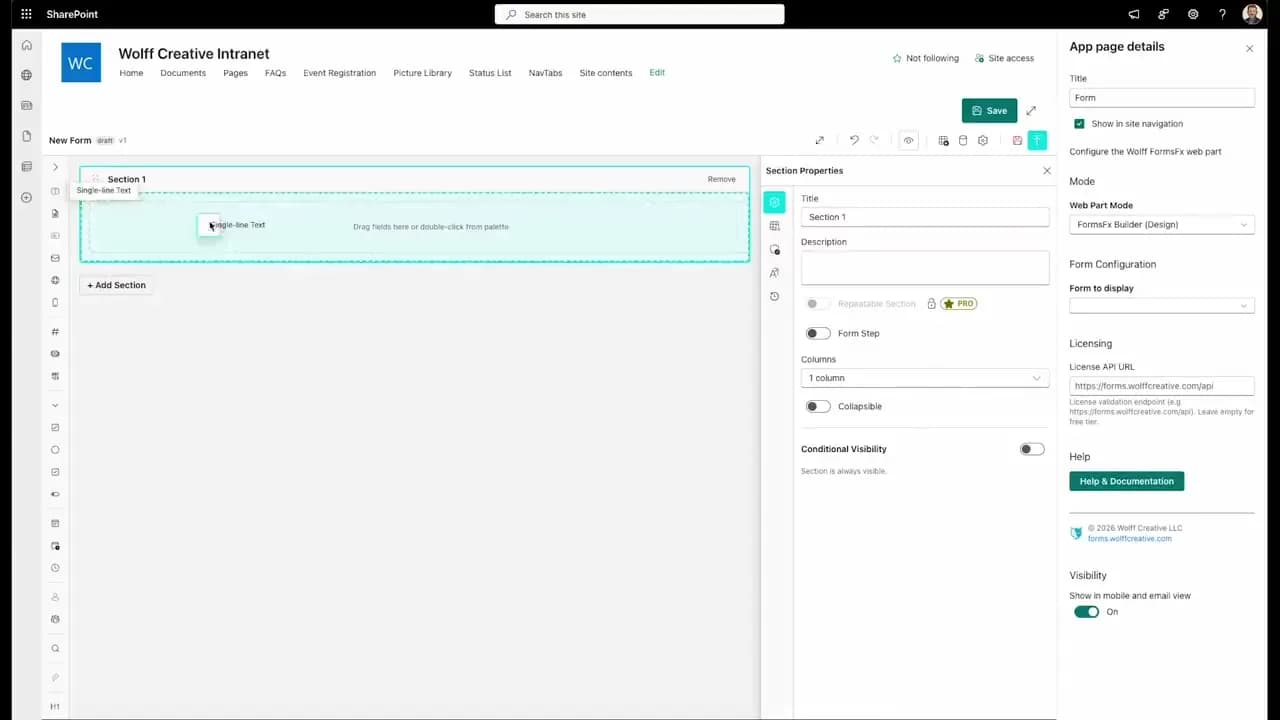
FormsFx: A Drag-and-Drop SharePoint Form Builder with Rules, Formulas, and Cascading Dropdowns
We built a SharePoint form builder that does what InfoPath did — conditional logic, calculated fields, cascading dropdowns — but runs natively as an SPFx web part. Here's how it works under the hood.
Read More →
FormsFx Has a Built-In Submissions Dashboard — Here's Why That Matters
Most SharePoint form builders stop at form submission. FormsFx includes a full dashboard for managing, searching, filtering, exporting, and approving submissions — no Power BI or custom views required.
Read More →
Offline Forms, Webhook Signatures, and Enterprise Connectors — FormsFx Beyond SharePoint Lists
FormsFx doesn't just write to SharePoint lists. It supports offline submission queuing, HMAC-signed webhooks for Power Automate, and enterprise connectors for SQL Server, Dataverse, REST APIs, and Azure Service Bus.
Read More →Need Help With This?
I help Eastern Shore businesses with web development, marketing, and AI automation. Let's talk about your project.
Need Help With Your Project?
Ready to take your business to the next level? Let's discuss how I can help.