Next.js vs WordPress in 2026: Which Is Better for Small Business Websites?
A practical comparison based on rebuilding my own website. Real-world insights on performance, SEO, maintenance, and when each platform makes sense.
Lighthouse score with optimizations
Perfect Lighthouse score
Performance: +15-25 points without effort
When I rebuilt wolffcreative.com in 2025, I chose Next.js 15 over WordPress. This wasn't about preferring "modern" over "traditional"—it was a strategic decision based on specific requirements. Here's an honest comparison to help you choose the right platform for your business.
The Rebuild: Why I Chose Next.js
My previous website was functional but outdated. I needed something that would:
- Demonstrate technical expertise through the site itself
- Achieve perfect performance scores (100 on Lighthouse)
- Support complex functionality (portfolio filtering, dynamic content)
- Maintain easily as a solo developer
- Scale effortlessly as content grows
- Optimize for local SEO in Ocean City, Maryland
After weighing options, I chose Next.js 15 with TypeScript and Tailwind CSS. Here's what I learned.
Performance: Next.js Wins (But WordPress Can Compete)
Next.js Performance
Out of the Box:
- Automatic code splitting
- Image optimization built-in
- Static generation for instant loading
- Server components reduce client JavaScript
- Edge caching capabilities
My Results:
- Lighthouse score: 100/100 performance
- Load time: <1 second on WiFi
- Load time: <3 seconds on 3G
- Time to Interactive: <2 seconds
How I Achieved This:
// Automatic image optimization
import Image from 'next/image';

<Image
  src="/portfolio-image.jpg"
  width={800}
  height={600}
  alt="Project screenshot"
  loading="lazy"
  sizes="(max-width: 768px) 100vw, 50vw"
/>

// Static generation for instant loading
export const metadata = {
  title: 'Portfolio',
  description: 'View my work...'
};

// Code splitting happens automatically
const PortfolioFilter = dynamic(() => import('@/components/PortfolioFilter'), {
  loading: () => <div>Loading...</div>
});
WordPress Performance
Default Performance: Mediocre to poor Optimized Performance: Good to excellent
Optimization Required:
- Caching plugin (WP Rocket, W3 Total Cache)
- Image optimization (ShortPixel, Imagify)
- CDN setup (Cloudflare, StackPath)
- Database optimization
- Theme optimization or custom development
- Hosting quality (critical factor)
Realistic Optimized Results:
- Lighthouse score: 70-95/100
- Load time: 2-4 seconds
- Requires ongoing maintenance
- Plugin conflicts can degrade performance
Verdict: Next.js for Speed, WordPress with Work
If performance is your top priority and you have development resources, Next.js delivers superior speed with less effort. WordPress can achieve good performance but requires careful optimization and ongoing maintenance.
SEO: Both Excellent (Different Approaches)
Next.js SEO
Advantages:
- Full control over meta tags and structure
- Server-side rendering for better crawlability
- Automatic sitemap generation
- Perfect semantic HTML
- Fast loading (ranking factor)
Implementation:
// Per-page metadata
export const metadata: Metadata = {
  title: 'Web Developer in Ocean City, MD',
  description: 'Professional web development services...',
  openGraph: {
    title: 'Web Developer in Ocean City, MD',
    description: 'Professional web development...',
    images: ['/og-image.jpg'],
  },
  alternates: {
    canonical: 'https://www.wolffcreative.com',
  },
};

// Structured data
const jsonLd = {
  '@context': 'https://schema.org',
  '@type': 'LocalBusiness',
  name: 'Wolff Creative',
  // ... additional schema
};Challenges:
- Manual meta tag management
- More technical knowledge required
- No visual SEO plugins
WordPress SEO
Advantages:
- Excellent plugins (Yoast, Rank Math, All in One SEO)
- Visual SEO management
- Automatic XML sitemaps
- Built-in blog functionality
- Proven SEO track record
Challenges:
- Plugin overhead affects performance
- Less control over technical implementation
- Potential plugin conflicts
Verdict: Tie (Different Skill Requirements)
WordPress makes SEO accessible to non-technical users through visual interfaces. Next.js requires coding knowledge but offers superior control and performance. Both can achieve excellent SEO results.
Content Management: WordPress Wins for Non-Technical Users
WordPress Content Management
Advantages:
- Visual editor (Gutenberg, page builders)
- Non-technical users can update easily
- Media library management
- User roles and permissions
- Preview before publishing
- Scheduling posts
Perfect For:
- Teams with content editors
- Frequent blog publishing
- Non-developer content updates
- Marketing teams managing content
Next.js Content Management
My Setup:
---
title: "Blog Post Title"
date: "2025-12-15"
category: "Web Development"
excerpt: "Post description..."
---

# Blog Post Content

Write in markdown...Advantages:
- Version control (Git)
- Markdown writing
- Type safety
- Developer-friendly workflow
Challenges:
- Requires technical knowledge
- No visual editor out of box
- Content in code repository
- Not suitable for non-technical editors
Solutions for Next.js:
- Add headless CMS (Contentful, Sanity, Strapi)
- Use MDX for rich content
- Build admin interface
- Accept technical workflow
Verdict: WordPress for Teams, Next.js for Developers
If you have content editors without coding skills, WordPress is the clear choice. For developer-managed sites or technical teams comfortable with markdown/code, Next.js works beautifully.
Maintenance: Next.js Requires Less Ongoing Work
Next.js Maintenance
What You Maintain:
- Upgrade Next.js (quarterly)
- Update dependencies (monthly)
- Deploy code changes
What You Don't Maintain:
- Database
- Plugins and their conflicts
- WordPress core updates
- Theme compatibility
- Security patches (hosting handles it)
My Experience:
- ~2 hours/month for updates
- Deploy in 30 seconds with Vercel/Railway
- No emergency security patches
WordPress Maintenance
Regular Maintenance:
- WordPress core updates (monthly)
- Plugin updates (weekly)
- Theme updates (as needed)
- Database optimization (monthly)
- Security monitoring (daily)
- Backup verification (weekly)
- Broken plugin troubleshooting (varies)
Time Investment:
- ~4-8 hours/month for proper maintenance
- Emergency fixes for breaking updates
- Plugin conflict resolution
Maintenance Costs:
- DIY: 4-8 hours/month
- Managed WordPress: $50-300/month
- Emergency fixes: $100-500 each
Verdict: Next.js for Lower Maintenance Burden
Next.js requires significantly less ongoing maintenance. WordPress sites need continuous attention to remain secure and functional.
Cost: WordPress Cheaper Upfront, Next.js Better Long-Term
WordPress Costs
Initial Development:
- DIY with theme: $100-500
- Custom theme: $2,000-10,000
- Agency build: $5,000-50,000+
Ongoing Costs:
- Hosting: $20-100/month
- Plugins/themes: $100-500/year
- Maintenance: $50-300/month
- Security: Included or $50+/month
- CDN: $0-50/month
Total First Year: $1,000-15,000+ Ongoing Annual: $1,500-5,000+
Next.js Costs
Initial Development:
- Developer build: $5,000-25,000
- (No DIY option for non-developers)
Ongoing Costs:
- Hosting: $0-50/month (Vercel free tier, Railway)
- Domain: $15/year
- Maintenance: Minimal
Total First Year: $5,000-25,000+ Ongoing Annual: $50-600
Verdict: WordPress Cheaper Initially, Next.js Cheaper Long-Term
WordPress has lower entry costs but higher ongoing expenses. Next.js requires higher initial investment but minimal ongoing costs make it cheaper over 3-5 years.
Flexibility and Customization
Next.js Flexibility
Advantages:
- Complete control over everything
- Any design or functionality possible
- No plugin limitations
- Modern React ecosystem
- API routes for backend functionality
Challenges:
- Everything built from scratch
- Requires development expertise
- Slower initial development
What I Built:
- Custom portfolio filtering system
- Dynamic Open Graph images
- Advanced SEO optimization
- Performance-optimized image loading
- Custom contact form integration
- Blog with markdown content
WordPress Flexibility
Advantages:
- 60,000+ plugins for most functionality
- Page builders for visual customization
- Themes provide starting points
- Add functionality without coding
Challenges:
- Plugin quality varies
- Plugin conflicts common
- Performance impact from plugins
- Theme limitations
Verdict: Next.js for Unique Needs, WordPress for Standard Features
If you need standard functionality (blog, forms, galleries), WordPress plugins provide quick solutions. For unique requirements or maximum performance, Next.js offers unlimited flexibility with code.
Security: Different Approaches
WordPress Security
Vulnerabilities:
- Frequent target for hackers
- Plugin vulnerabilities common
- Outdated WordPress = security risk
- Database can be compromised
Mitigation:
- Security plugins (Wordfence, Sucuri)
- Regular updates critical
- Strong passwords and 2FA
- Quality hosting with security features
- Regular backups essential
Next.js Security
Advantages:
- No database to compromise
- No admin login to hack
- No plugin vulnerabilities
- Modern secure-by-default practices
- Static files harder to exploit
Considerations:
- Secure API routes properly
- Protect environment variables
- Validate user input
- Use security headers
Verdict: Next.js More Secure by Default
Next.js's static or serverless nature eliminates many common WordPress attack vectors. WordPress requires constant vigilance and security measures.
Developer Experience
Next.js Developer Experience
Advantages:
- Modern React development
- TypeScript support
- Hot reload during development
- Component-based architecture
- Git version control
- Excellent documentation
My Workflow:
# Development
npm run dev

# Build and test
npm run build
npm start

# Deploy
git push origin main
Perfect For:
- Developers comfortable with React
- TypeScript enthusiasts
- Modern JavaScript developers
- Version control workflow users
WordPress Developer Experience
Advantages:
- Established patterns and documentation
- Huge community and resources
- Many developers available to hire
- Theme development framework
- Plugin ecosystem
Challenges:
- PHP (older language)
- Mixed code quality in ecosystem
- Database dependency
- Less modern development practices
Verdict: Next.js for Modern Developers, WordPress for Broad Availability
If you're a React/JavaScript developer or hiring one, Next.js offers a superior development experience. WordPress has a larger hiring pool but less modern tooling.
Real-World Use Cases
Choose Next.js When:
-
Performance is Critical
- Portfolio or agency websites
- Landing pages for conversion
- Sites showcasing technical expertise
-
You're a Developer
- Personal portfolio
- Side projects
- Technical blogging
-
Unique Requirements
- Custom functionality
- Complex interactions
- No suitable WordPress plugins
-
Long-Term Cost Matters
- Lower ongoing expenses
- Minimal maintenance
- Predictable scaling
My Decision: Wolff Creative fit all these criteria. I needed maximum performance, unique portfolio functionality, and wanted to demonstrate technical expertise through the site itself.
Choose WordPress When:
-
Non-Technical Team
- Marketing teams managing content
- Multiple content editors
- Visual content management needed
-
Standard Functionality
- Blog-focused sites
- E-commerce (WooCommerce)
- Membership sites
- Directory listings
-
Budget Constraints
- Lower initial development cost
- Can't afford custom development
- Need quick launch
-
Established Ecosystem
- Need specific plugins
- Designers familiar with WordPress
- Existing WordPress knowledge
When I Recommend WordPress: Client websites where the marketing team needs to update content frequently, blogs with multiple authors, or businesses needing e-commerce without custom development budget.
Performance Comparison: Real Numbers
Wolff Creative (Next.js 15)
Metrics:
- Lighthouse Performance: 100/100
- First Contentful Paint: 0.8s
- Time to Interactive: 1.9s
- Total Bundle Size: 150KB
- Load Time (3G): 2.8s
Technologies:
- Next.js 15 with App Router
- TypeScript for type safety
- Tailwind CSS for styling
- Railway hosting
Typical WordPress Site (Optimized)
Metrics:
- Lighthouse Performance: 75-85/100
- First Contentful Paint: 2-3s
- Time to Interactive: 3-5s
- Total Page Size: 1-3MB
- Load Time (3G): 5-8s
Optimizations Applied:
- WP Rocket caching
- Image optimization
- CDN (Cloudflare)
- Quality hosting
Migration Considerations
From WordPress to Next.js
When It Makes Sense:
- Want better performance
- Have development resources
- Content is mostly static
- Willing to invest in custom development
Challenges:
- Rebuild required (no direct migration)
- Content needs restructuring
- Losing WordPress ecosystem
- Team needs different skills
My Migration:
- Audited existing content
- Restructured for markdown
- Rebuilt design from scratch
- Implemented portfolio system
- Optimized for SEO
- Deployed and tested
Time Investment: ~40 hours for complete rebuild
From Next.js to WordPress
When It Makes Sense:
- Need non-technical content editing
- Want plugin ecosystem
- Hiring WordPress developers easier
- Need quick feature additions
Challenges:
- Performance will decrease
- Ongoing maintenance increases
- Security becomes concern
- Hosting costs increase
Hybrid Approach: Headless WordPress
Best of Both Worlds:
- WordPress as headless CMS (backend only)
- Next.js for frontend
- Content editors use WordPress
- Developers use React/Next.js
Advantages:
- WordPress content management
- Next.js performance
- Separate concerns
- Team workflow flexibility
Challenges:
- More complex architecture
- Higher development cost
- Requires both skillsets
- Additional moving parts
When to Use:
- Large content teams
- Need WordPress plugins
- Want Next.js performance
- Have development budget
My Recommendation Framework
Ask yourself these questions:
1. Who Updates Content?
- Developers/technical team → Next.js
- Marketing/non-technical team → WordPress
- Mix of both → Headless WordPress + Next.js
2. What's Your Budget?
- <$5,000 initial → WordPress with theme
- $5,000-15,000 → Custom WordPress or Next.js
- $15,000+ → Next.js or headless architecture
3. What's Your Timeline?
- <2 weeks → WordPress with theme
- 1-2 months → Custom WordPress
- 2-3 months → Next.js custom build
4. What Functionality Do You Need?
- Standard features (blog, forms) → WordPress
- E-commerce → WordPress (WooCommerce) or dedicated platform
- Unique/custom → Next.js
- Complex applications → Next.js
5. How Important is Performance?
- Critical (conversion depends on speed) → Next.js
- Important but not critical → Optimized WordPress
- Not a priority → WordPress
6. Who Maintains It?
- In-house developer → Next.js
- Agency/freelancer → Either (based on expertise)
- Marketing team → WordPress
- No one (minimal maintenance) → Next.js
Conclusion
There's no universal "better" choice between Next.js and WordPress—it depends on your specific needs, team, and resources.
Choose Next.js when:
- Performance is critical
- You have development resources
- Content updates are infrequent
- You want minimal maintenance
- Long-term cost matters
- Technical team manages site
Choose WordPress when:
- Non-technical team needs content control
- Quick launch with standard features
- Lower initial budget
- Large content editing team
- Established plugin meets needs
- E-commerce with WooCommerce
For Wolff Creative, Next.js was the right choice. I needed maximum performance, wanted to showcase technical expertise, and as a solo developer, didn't need WordPress's content management features. The result: 100/100 Lighthouse score, minimal maintenance, and a site that demonstrates my capabilities to potential clients.
Your decision should be based on your team's skills, budget, timeline, and specific requirements—not what's trendy or what worked for someone else's different situation.
Ready to Build Your Website?
Whether you need a high-performance Next.js site or a WordPress solution, I can help you choose the right platform and build something that serves your business goals. Let's discuss your requirements and find the best approach for your specific needs.
Get a Free Website Strategy Quote
Need a web developer or website designer? I build modern websites with Next.js and WordPress based on your specific requirements, team structure, and business goals. Let's discuss your project.
Tags

About Kevin Wolff
Kevin is a web developer and digital strategist based in Ocean City, MD. He specializes in creating modern websites, SharePoint solutions, and digital marketing strategies that help businesses grow online.
Free: AI Readiness Checklist
Subscribe and instantly download our 15-question checklist to discover where AI automation can save you time and grow your business.
Related Articles
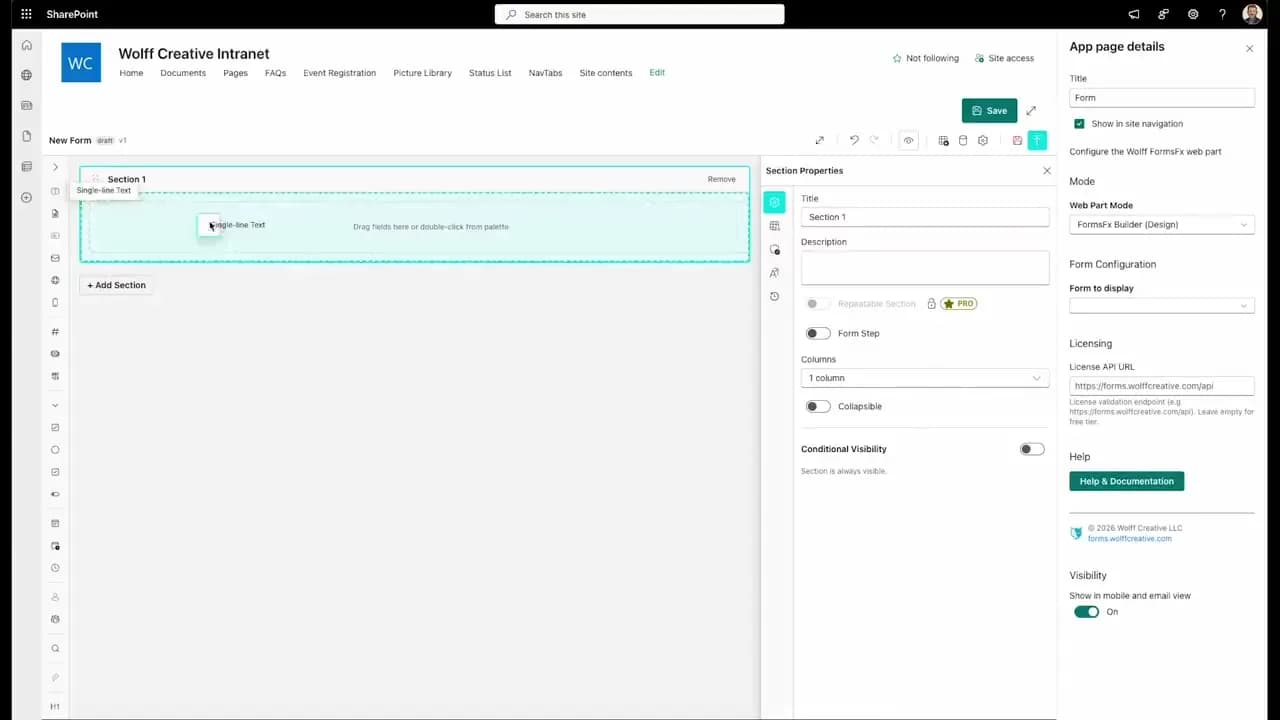
FormsFx: A Drag-and-Drop SharePoint Form Builder with Rules, Formulas, and Cascading Dropdowns
We built a SharePoint form builder that does what InfoPath did — conditional logic, calculated fields, cascading dropdowns — but runs natively as an SPFx web part. Here's how it works under the hood.
Read More →
FormsFx Has a Built-In Submissions Dashboard — Here's Why That Matters
Most SharePoint form builders stop at form submission. FormsFx includes a full dashboard for managing, searching, filtering, exporting, and approving submissions — no Power BI or custom views required.
Read More →
Offline Forms, Webhook Signatures, and Enterprise Connectors — FormsFx Beyond SharePoint Lists
FormsFx doesn't just write to SharePoint lists. It supports offline submission queuing, HMAC-signed webhooks for Power Automate, and enterprise connectors for SQL Server, Dataverse, REST APIs, and Azure Service Bus.
Read More →Need Help With This?
I help Eastern Shore businesses with web development, marketing, and AI automation. Let's talk about your project.
Need Help With Your Project?
Ready to take your business to the next level? Let's discuss how I can help.