SharePoint Online vs. Traditional Websites: What's Best for Your Business?
Understanding when to choose SharePoint over a traditional website for your business needs.
When planning your organization's web presence, you might find yourself choosing between SharePoint Online and a traditional website. Both have their strengths, but the right choice depends on your specific business needs, team size, and goals.
What is SharePoint Online?
SharePoint Online is Microsoft's cloud-based collaboration platform that combines website functionality with powerful document management, workflow automation, and team collaboration features. It's part of the Microsoft 365 suite and integrates seamlessly with other Microsoft tools.
What is a Traditional Website?
A traditional website is typically built using platforms like WordPress, custom HTML/CSS, or modern frameworks like React or Next.js. These sites focus primarily on public-facing content and marketing, with varying degrees of interactivity.
Key Differences at a Glance
| Feature | SharePoint Online | Traditional Website |
|---|---|---|
| Primary Purpose | Collaboration & internal tools | Public marketing & information |
| Best For | Teams, document sharing, workflows | Marketing, sales, customer engagement |
| User Base | Internal teams, authenticated users | General public, customers |
| Setup Complexity | Moderate (requires M365 knowledge) | Varies (simple to complex) |
| Cost | $5-22/user/month (part of M365) | $50-500+/month (hosting + maintenance) |
| Customization | Limited but powerful within ecosystem | Unlimited with technical skills |
When to Choose SharePoint Online
Perfect for Organizations That Need:
1. Document Management & Collaboration
- Teams need to collaborate on documents in real-time
- Version control and approval workflows are essential
- Document security and permissions are critical
- Integration with Office apps (Word, Excel, PowerPoint) is important
2. Workflow Automation
- Approval processes for documents, expenses, or requests
- Automated notifications and task assignments
- Integration with other Microsoft 365 apps
- Custom business process automation
3. Internal Communication & Knowledge Sharing
- Company intranets and internal news
- Team sites for different departments
- Knowledge bases and documentation repositories
- Employee directories and organizational charts
4. Existing Microsoft 365 Environment
- Already using Microsoft 365 for email and productivity
- Teams, OneDrive, and other Microsoft tools are in use
- Need for unified user management and authentication
- Compliance requirements that Microsoft 365 addresses
SharePoint Success Story: TidalHealth
At TidalHealth Peninsula Regional, I led a SharePoint migration that:
- Successfully migrated entire healthcare system to SharePoint Online
- Automated numerous manual workflows through Power Platform
- Served 5,400+ employees with zero downtime during migration
- Improved collaboration across 12 hospital locations
When to Choose a Traditional Website
Ideal for Businesses That Need:
1. Public Marketing & Customer Acquisition
- Primary goal is attracting new customers
- SEO and search engine visibility are crucial
- Need for conversion optimization and lead generation
- Integration with marketing tools and analytics
2. E-commerce & Online Sales
- Selling products or services online
- Need shopping cart and payment processing
- Product catalogs and inventory management
- Customer accounts and order tracking
3. Complete Design Control
- Unique branding and custom design requirements
- Specific user experience needs
- Complex animations or interactions
- Mobile-first or progressive web app functionality
4. Content Management & Blogging
- Regular blog posts and content updates
- SEO-optimized content management
- Social media integration
- Email marketing and newsletter signups
Traditional Website Success Story: Ocean City Restaurant
For a local restaurant, I built a custom website that:
- Implemented integrated online ordering system for direct customer orders
- Created fully responsive design optimized for mobile users
- Added real-time reservation system for table bookings
- Enhanced local SEO for tourist discovery
Hybrid Approach: Best of Both Worlds
Many organizations benefit from using both:
Public Website (Traditional)
- Marketing and customer-facing content
- SEO optimization for customer acquisition
- Lead generation and contact forms
- Product or service showcases
Internal Portal (SharePoint)
- Employee collaboration and document management
- Workflow automation and business processes
- Internal communication and knowledge sharing
- Integration with business applications
Decision Framework
Ask yourself these questions:
Choose SharePoint Online if:
- ✅ You have 10+ employees who need to collaborate
- ✅ Document management and workflows are priorities
- ✅ You're already using Microsoft 365
- ✅ Internal communication and collaboration are main goals
- ✅ Compliance and security are critical requirements
Choose Traditional Website if:
- ✅ Your primary goal is customer acquisition
- ✅ SEO and online visibility are crucial
- ✅ You need e-commerce functionality
- ✅ Unique design and branding are important
- ✅ You want complete control over functionality
Consider Both if:
- ✅ You have both internal team collaboration needs AND external marketing goals
- ✅ Budget allows for separate internal and external platforms
- ✅ You want to optimize each platform for its specific purpose
Cost Considerations
SharePoint Online Costs:
- Microsoft 365 licensing: $5-22/user/month
- Initial setup and customization: $5,000-$25,000
- Ongoing maintenance: $500-$2,000/month
- Training: $1,000-$5,000
Traditional Website Costs:
- Initial development: $2,500-$25,000+
- Hosting: $20-$200/month
- Maintenance: $250-$1,000/month
- Updates and improvements: $1,000-$5,000/year
Making the Right Choice
The decision isn't just about features—it's about your business goals, team needs, and growth plans. Consider:
- Your primary objectives (internal collaboration vs. customer acquisition)
- Current technology stack and team familiarity
- Budget for initial setup and ongoing maintenance
- Timeline and urgency of implementation
- Future growth and scalability needs
Need Help Deciding?
Choosing between SharePoint Online and a traditional website is a strategic decision that impacts your business operations and growth. I've helped organizations of all sizes make this choice and implement the right solution.
Ready to explore your options? Let's discuss your specific needs and determine the best approach for your business.
Have questions about SharePoint Online or need a custom website? I specialize in both platforms and can help you choose and implement the right solution for your business needs.
Tags

About Kevin Wolff
Kevin is a web developer and digital strategist based in Ocean City, MD. He specializes in creating modern websites, SharePoint solutions, and digital marketing strategies that help businesses grow online.
Free: AI Readiness Checklist
Subscribe and instantly download our 15-question checklist to discover where AI automation can save you time and grow your business.
Related Articles
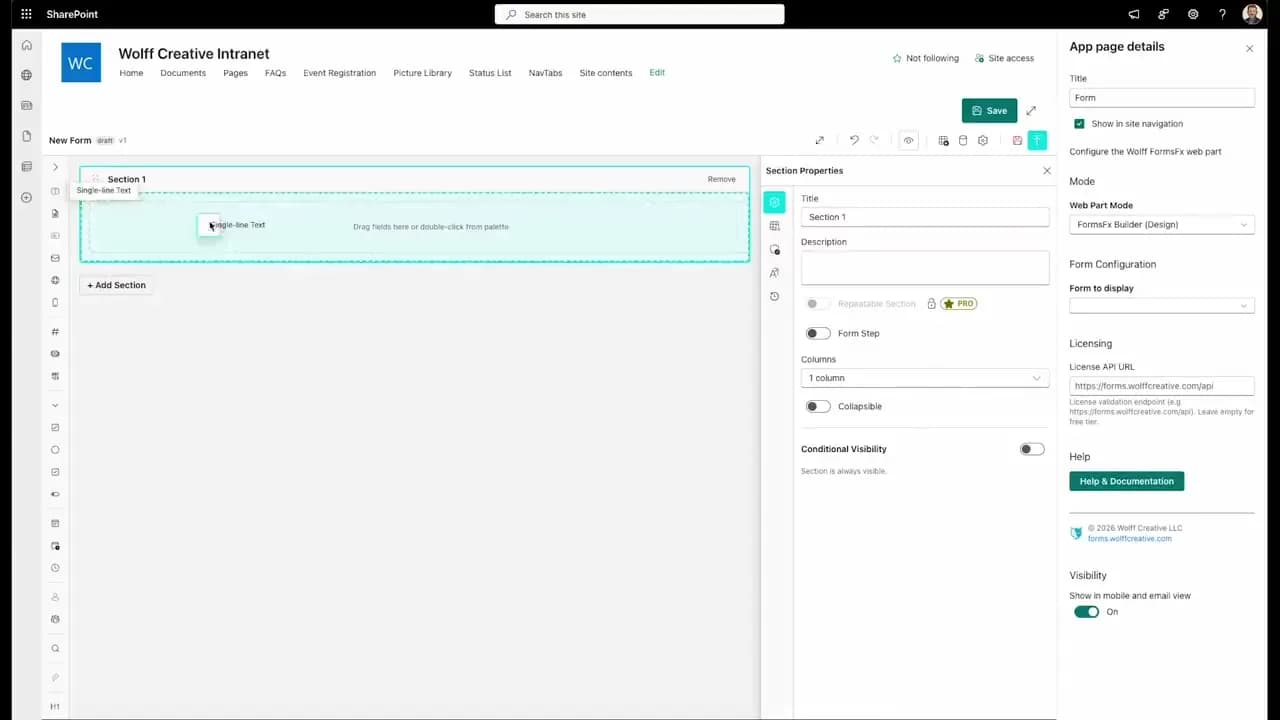
FormsFx: A Drag-and-Drop SharePoint Form Builder with Rules, Formulas, and Cascading Dropdowns
We built a SharePoint form builder that does what InfoPath did — conditional logic, calculated fields, cascading dropdowns — but runs natively as an SPFx web part. Here's how it works under the hood.
Read More →
FormsFx Has a Built-In Submissions Dashboard — Here's Why That Matters
Most SharePoint form builders stop at form submission. FormsFx includes a full dashboard for managing, searching, filtering, exporting, and approving submissions — no Power BI or custom views required.
Read More →
Offline Forms, Webhook Signatures, and Enterprise Connectors — FormsFx Beyond SharePoint Lists
FormsFx doesn't just write to SharePoint lists. It supports offline submission queuing, HMAC-signed webhooks for Power Automate, and enterprise connectors for SQL Server, Dataverse, REST APIs, and Azure Service Bus.
Read More →Need Help With This?
I help Eastern Shore businesses with web development, marketing, and AI automation. Let's talk about your project.
Need Help With Your Project?
Ready to take your business to the next level? Let's discuss how I can help.