WC - Events: A Free SharePoint Web Part That Shows the Fields You Actually Need
The out-of-the-box SharePoint Events web part ignores your custom columns. WC - Events lets you pick any list, map your columns, and choose exactly which fields appear — no code required.
If you've ever tried to display custom event data in SharePoint, you already know the frustration. The out-of-the-box Events and Calendar web parts show title, date, and location — and that's it. If your events list has registration links, categories, contact emails, knowledge levels, or any other custom columns, the built-in web parts simply ignore them.
I built WC - Events to fix that. It's free, open source, and available right now.
The Problem with SharePoint's Built-In Events Web Part
SharePoint's default Events web part was designed for simple use cases: a title, a date, maybe a location. That works fine for basic team calendars. But the moment you add custom columns — and every organization I've worked with does — you hit a wall.
Here's what I kept running into across client projects:
- Training coordinators needed to show knowledge level, batch number, and registration links on event cards
- HR departments wanted category labels and contact emails visible without clicking into each event
- Project managers needed custom status fields and document links displayed alongside dates
- IT teams tracked maintenance windows with impact categories and notification groups
Every time, the answer was the same: the built-in web part can't do it. You either build a custom solution from scratch, buy a third-party tool, or tell your users to click into every single event to see the information they need.
None of those options felt right. So I built one that handles all of them.
What WC - Events Does Differently
The core idea is simple: you pick the list, you map the columns, you choose what shows up. Everything is configured through the property pane — no code, no JSON files, no deployment headaches beyond the initial install.
Flexible Column Mapping
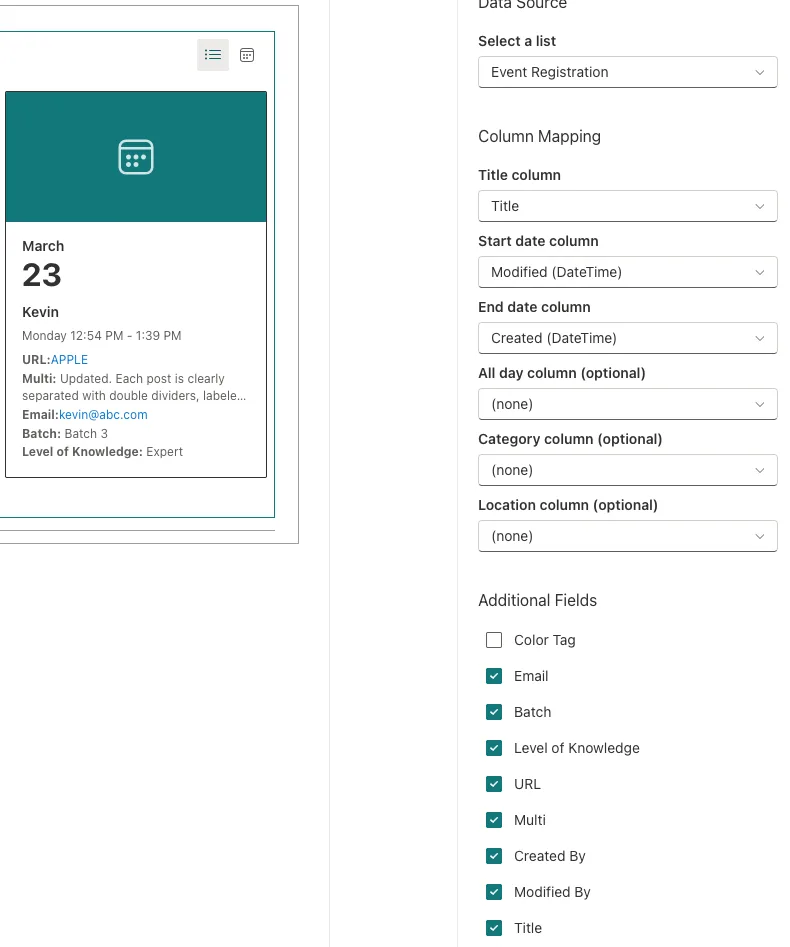
Point the web part at any SharePoint list. It auto-detects standard Events list fields and common column names, but you can override every mapping:
- Title column — which field to use as the event name
- Start/End date columns — your date fields, whatever they're called
- All-day flag — boolean column for all-day events
- Category — choice or text column for labeling
- Location — text field for venue or room info
- Additional fields — check any extra columns to display on cards and in the detail panel
That last one is the key differentiator. Want to show a registration URL, a contact email, a custom "Department" choice column, and a multi-line description? Check the boxes. They show up on the cards and in the detail panel automatically.
Three View Options
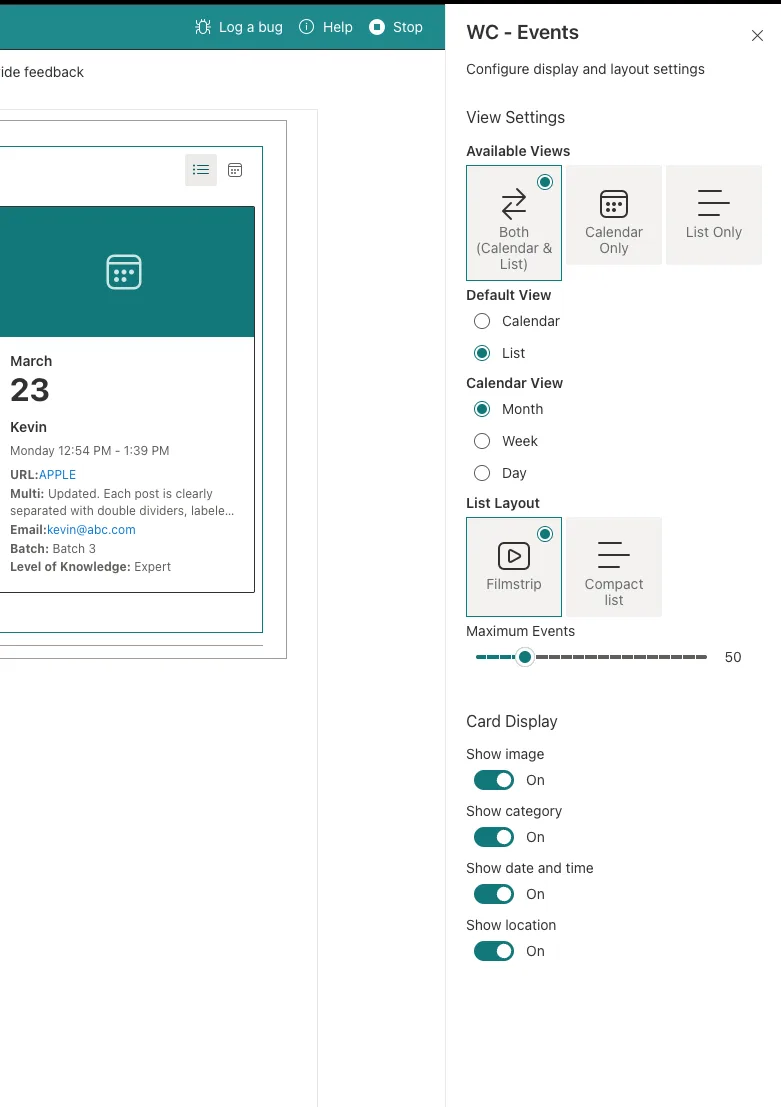
Different teams prefer different layouts, so WC - Events ships with three:
Filmstrip Layout Horizontal scrolling cards with pagination dots — visually matches the native SharePoint Events web part design, so it feels familiar. But now your cards can show category labels, times, locations, images, and any additional fields you've selected.
Compact List Layout A vertical event list grouped by relative dates: Today, Tomorrow, This Week, Next Week, Later. Clean and scannable for teams that just need a quick view of what's coming up.
Calendar View A full interactive calendar powered by FullCalendar, with month, week, and day views. Click any event to open the detail panel with all your custom field data.
You can enable both calendar and list views with a toggle, or lock the web part to a single view. The default view is configurable from the property pane.
Smart Detail Panel
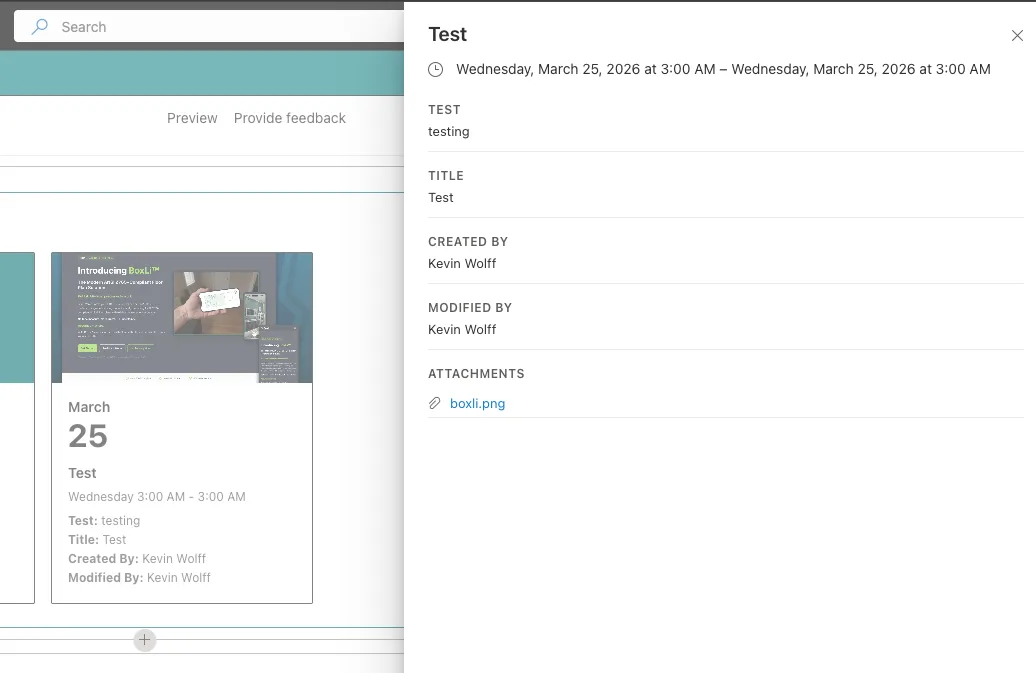
Click any event card to open a Fluent UI side panel with the full picture:
- All mapped fields with labels
- Additional fields you've selected
- Event images and list item attachments
- Auto-linked URLs, email addresses, and SharePoint file paths
- Person and Lookup field values resolved to display names
- Rich text and multi-line content rendered cleanly
No more telling users to "open the list item to see the details." The details come to them.
Auto-Detection and Quality-of-Life Features
Small details matter when people are configuring web parts across dozens of sites. WC - Events handles several things automatically:
Auto-detection — When you select a list, the web part scans for standard field names (Title, EventDate, EndDate, Location, Category) and maps them automatically. If your list follows common naming conventions, configuration takes about 30 seconds.
Auto-linking — Email addresses become mailto: links. URLs become clickable. SharePoint file paths open in their respective apps. No manual formatting required.
Theme-aware styling — The web part inherits your SharePoint site's theme colors. Dark theme, custom branding, tenant themes — it all just works.
Attachment support — If list items have file attachments, they appear in the detail panel as clickable links. Image attachments are automatically used as card thumbnails.
Card display toggles — Show or hide the image, category label, date/time, and location on cards from the property pane. Useful when you want a minimal card design or when certain fields aren't relevant.
The Technical Stack
For developers curious about what's under the hood:
| Technology | Version | Purpose |
|---|---|---|
| SharePoint Framework | 1.22.2 | Web part platform |
| React | 17.0.1 | UI rendering |
| TypeScript | 5.8.x | Type safety |
| Fluent UI React | 8.x | Native SharePoint controls |
| FullCalendar | 6.x | Calendar grid views |
| PnPjs | 4.x | SharePoint REST API client |
The project follows a clean component architecture:
src/webparts/eventCalendar/
  components/
    EventCalendar.tsx       # Root — view switching, loading, errors
    CalendarView.tsx        # FullCalendar wrapper
    FilmstripView.tsx       # Horizontal card carousel
    ListView.tsx            # Grouped compact list
    EventCard.tsx           # Card renderer (both variants)
    EventDetailPanel.tsx    # Side panel with full details
    ViewToggle.tsx          # Calendar/List toggle
    FieldBadge.tsx          # Dynamic field value renderer
  services/
    EventService.ts         # List item fetching and mapping
    FieldService.ts         # Field metadata and auto-detection
  hooks/
    useEvents.ts            # Data fetching hook
    useFields.ts            # Field metadata hook
Custom React hooks handle data fetching and caching. Services encapsulate all SharePoint API interactions through PnPjs. Components are focused and composable. If you want to fork it and add your own view type, the architecture makes that straightforward.
Getting Started
Prerequisites
- SharePoint Online environment with an App Catalog
- Node.js v22.14.0+ (LTS)
Installation
- Clone the repository and run
npm install - Build the production package with
npm run build - Upload
sharepoint/solution/event-calendar-wp.sppkgto your tenant App Catalog - Check "Make this solution available to all sites in the organization" for tenant-wide deployment
- Add the WC - Events web part to any SharePoint page
Configuration
Once the web part is on a page:
- Select your list — any list with date fields works
- Verify column mappings — auto-detection handles most standard lists; adjust if your column names are non-standard
- Check additional fields — select the custom columns you want displayed
- Set display preferences — choose views, toggle card elements, set the max event count
- Publish the page
Total setup time for a standard events list: under two minutes.
Known Limitations
Transparency matters. Here's what WC - Events doesn't do yet:
- No recurrence expansion — Recurring events show as single items. Recurrence pattern parsing is on the roadmap.
- Lookup/Person field limits — Fields requiring
$expand(like multi-person pickers) are excluded from REST queries to prevent API errors. Use the lookup's ID column as a workaround. - Fixed card width — Filmstrip cards are 260px wide. Responsive card sizing is planned for a future release.
- Image detection — Only URLs ending in standard image extensions (.jpg, .png, .gif, .webp, .svg, .bmp) are rendered as thumbnails. Other URL fields display as links.
Why Open Source?
I've spent years building custom SharePoint solutions for clients — from org charts serving 5,000+ employees to department dashboards and workflow applications. A pattern I keep seeing: organizations spend real money solving problems that shouldn't require a budget line item.
Displaying custom fields on event cards isn't a complex engineering challenge. It's a gap in the out-of-the-box tooling that Microsoft hasn't addressed. WC - Events fills that gap, and I'm releasing it as a free, MIT-licensed project because I think it should exist as a community resource.
Use it as-is. Fork it. Improve it. Submit a PR. The code is clean, well-structured, and built on the same modern stack I use for enterprise client work.
What's Next
Future releases will focus on:
- Recurrence expansion — Parsing recurring event patterns into individual occurrences
- Responsive card sizing — Adaptive card widths based on container size
- Additional view types — Agenda view, timeline view
- Enhanced filtering — Category and date range filters in the UI
- Multi-list support — Aggregate events from multiple lists into a single view
If you have feature requests or find bugs, open an issue on the repository. Contributions are welcome.
Need Custom SharePoint Development?
WC - Events is a general-purpose tool. If your organization needs something more tailored — custom web parts, workflow automation, intranet redesigns, or enterprise-scale solutions — that's what I do professionally.
Let's Talk About Your SharePoint Project
WC - Events is a free, open-source SharePoint Framework web part built by Wolff Creative. It's MIT-licensed and available on GitHub. Get in touch if you need custom SharePoint development for your organization.
Tags

About Kevin Wolff
Kevin is a web developer and digital strategist based in Ocean City, MD. He specializes in creating modern websites, SharePoint solutions, and digital marketing strategies that help businesses grow online.
Free: AI Readiness Checklist
Subscribe and instantly download our 15-question checklist to discover where AI automation can save you time and grow your business.
Related Articles
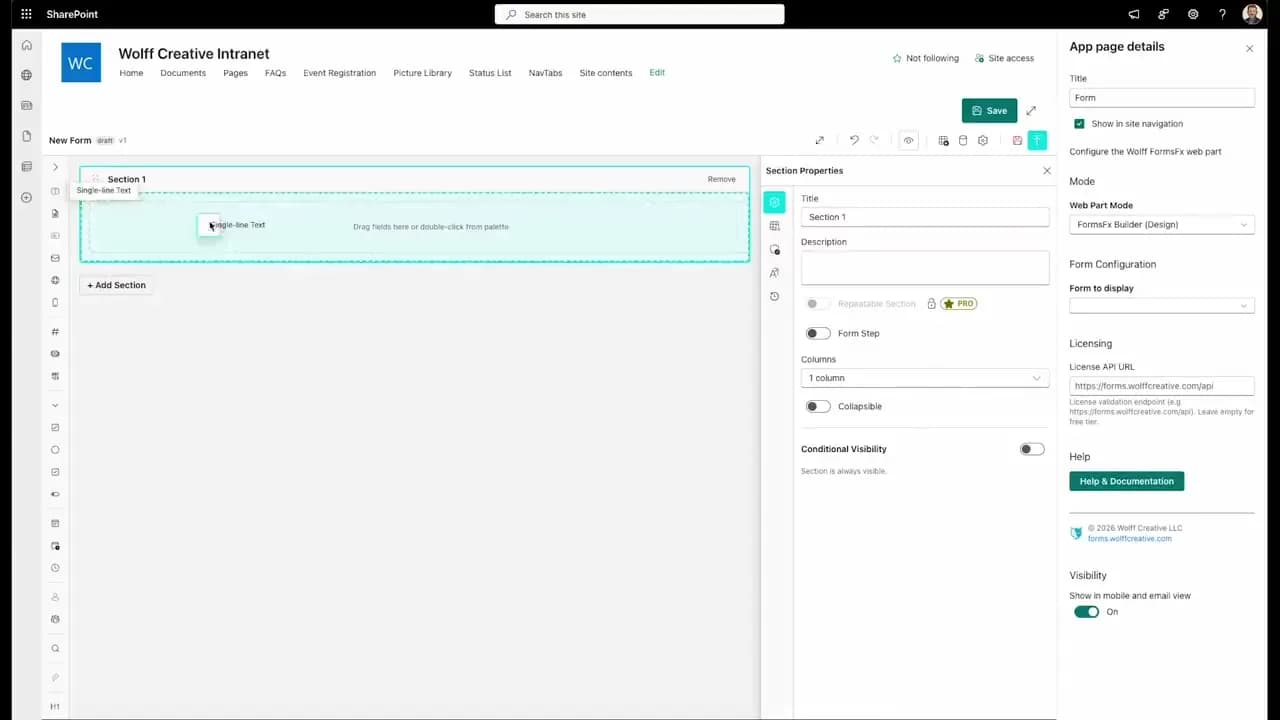
FormsFx: A Drag-and-Drop SharePoint Form Builder with Rules, Formulas, and Cascading Dropdowns
We built a SharePoint form builder that does what InfoPath did — conditional logic, calculated fields, cascading dropdowns — but runs natively as an SPFx web part. Here's how it works under the hood.
Read More →
FormsFx Has a Built-In Submissions Dashboard — Here's Why That Matters
Most SharePoint form builders stop at form submission. FormsFx includes a full dashboard for managing, searching, filtering, exporting, and approving submissions — no Power BI or custom views required.
Read More →
Offline Forms, Webhook Signatures, and Enterprise Connectors — FormsFx Beyond SharePoint Lists
FormsFx doesn't just write to SharePoint lists. It supports offline submission queuing, HMAC-signed webhooks for Power Automate, and enterprise connectors for SQL Server, Dataverse, REST APIs, and Azure Service Bus.
Read More →Need Help With This?
I help Eastern Shore businesses with web development, marketing, and AI automation. Let's talk about your project.
Need Help With Your Project?
Ready to take your business to the next level? Let's discuss how I can help.